











Retail teams don't need another reminder that "visibility matters." You need a practical way to win attention in a crowded aisle and prove the spend was worth it.
That's exactly what point of purchase displays (often shortened to POP displays) are designed to do: influence a shopper's decision when they're close enough to buy.
What point of purchase displays are
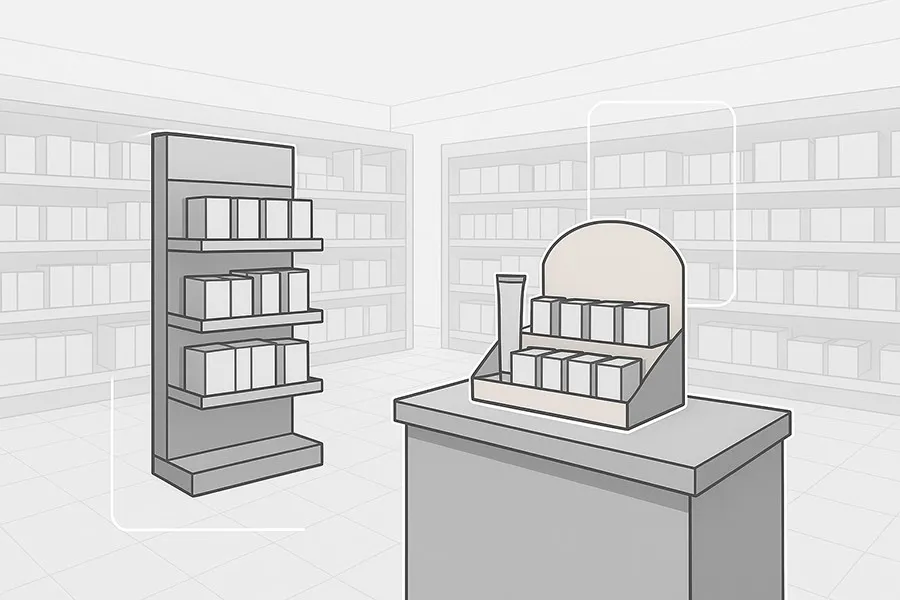
A point of purchase (POP) display is a physical or digital merchandising unit placed in a store to spotlight a product at a decision point-endcaps, aisle intersections, entrances, and category hot spots.
It's different from everyday shelving because it's built to interrupt shopping autopilot: it presents a curated offer, a clear message, and an easier "yes" than the surrounding shelf.
POP vs POS: a quick distinction
People often mix up POP and POS. If you're searching "point of sale display vs point of purchase display," here's the practical difference.
- POP (point of purchase): influences decisions throughout the store-where shoppers browse and compare. These are in-store merchandising displays designed to stop the scroll of the aisle.
- POS (point of sale): influences decisions at checkout-where last-minute add-ons happen.
Why POP displays drive sales (the four mechanisms)
POP displays aren't "magic." They work when they change shopper behavior in specific, measurable ways.
1) They win attention when it matters
Most categories are visually noisy. POP displays create contrast through size, position, and visual hierarchy-so the product becomes the obvious choice to notice first.
This is especially valuable for:
- new launches
- seasonal items
- promotions that need fast awareness
In other words: the role of point of purchase displays is to create a controlled moment of attention in an otherwise uncontrolled environment.
2) They reduce decision friction
Shoppers don't abandon purchases only because of price-they abandon because it's mentally easier to keep moving.
A good POP display reduces friction by:
- narrowing the choice to one hero SKU (or a small set)
- making the offer obvious ("new," "limited," "best value," "bundle") without long copy
- keeping product accessible (easy grab, easy return)
3) They create impulse opportunities
Impulse isn't just candy at checkout. It's any moment a shopper sees something that feels:
- relevant right now
- low risk
- easy to add
Checkout displays are the classic POS case, but POP placements in the aisle can trigger impulse too-especially when the display makes the decision simple.
4) They increase basket size through smart bundling
POP displays can act like a physical cross-sell.
Examples:
- chips + salsa
- razors + shaving gel
- batteries + toys
If the display does the "pairing thinking" for the shopper, units per transaction tends to rise.
Pro Tip: If your display is meant to lift basket size, build the message around the bundle ("complete the set") rather than the individual item.
Retail POP display types (and what they're best for)
Here's a practical way to think about retail POP display types: match the display type to the store zone and the job you need it to do.
|
Display type |
Best placement |
Best for |
|
Floor display stands |
Aisle edge, high-traffic category areas |
New launches, seasonal features, multi-SKU storytelling |
|
Counter displays |
Checkout or service counter |
Small items, last-minute add-ons |
|
Endcap displays |
End of aisle |
High visibility + fast conversion |
|
Dump bins |
Promo zones and seasonal areas |
Volume promotions, fast-moving items |
Placement matters more than most teams admit
Two displays with the same graphics can perform very differently based on placement.
A simple placement rule:
- Entrance / feature zone: awareness and brand cueing
- Endcap: discovery + conversion
- Aisle adjacency: decision support near the shelf set
- Checkout: add-ons and impulse
How to measure whether your POP display worked
If you can't measure it, you can't scale it. For most POP displays in retail, you don't need a perfect model-you need a consistent test method and a few core KPIs.
Here's a lightweight measurement approach that enterprise retail teams can actually run without building a full analytics project.
Start with the KPI that matters: incremental sales lift
The cleanest measure is sales lift vs. baseline (or vs. a control store).
How to do it:
1.Pick a test window (e.g., 2–4 weeks) with stable pricing and promo conditions.
2.Compare featured-SKU sales during the display window to a baseline period (same store) or to matched stores without the display.
3.Track out-of-stocks-because a "failed" display might just be a supply issue.
Add 3 supporting metrics
- Sell-through: Did inventory move faster than the shelf baseline?
- Units per transaction: Did shoppers buy more units (or the bundle)?
- Compliance: Was the display actually in place, properly set, and stocked for the full window?
If you're using digital signage as part of the POP execution, Digital Signage Today cites a four-year randomized study across 237 in-store digital signage campaigns that found an average 8.1% sales lift. Treat that as a directional example for digital campaigns-not a guaranteed result for every display.
What enterprise teams should ask before rolling out a POP program
Even at the awareness stage, it helps to know what "good" looks like.
Use these questions internally (or with a display partner) to reduce risk:
- What is the single job of this display-awareness, conversion, or basket-building?
- Which store zone gives us the best shot at that job?
- What's the expected display life: 2 weeks, 6 weeks, 12+ weeks?
- What constraints do we have (retailer specs, safety, palletization, sustainability requirements)?
- How will we verify compliance-photos, store checks, or a field team?
- What's the plan for replenishment and damaged units?